

If your website has outgrown shared hosting, you need more control over your server, or you want to run applications such as Node.js, Python, Docker, or a custom database, VPS hosting is often the next option to consider.
VPS stands for Virtual Private Server. It uses virtualization technology to divide a physical server into multiple isolated virtual servers. Each VPS operates as its own server environment with allocated CPU, RAM, storage, an operating system, and administrative control.
In simple terms, VPS hosting gives you more control and resources than typical shared hosting without requiring you to rent an entire dedicated physical server.
But understanding what a VPS is only solves part of the problem.
You also need to know how VPS hosting works, what you can host on it, how much RAM or CPU you might need, whether managed or unmanaged VPS is right for you, and what to look for when choosing VPS hosting in Nepal.
This guide covers all of those questions.
What Is VPS Hosting?
A Virtual Private Server (VPS) is a virtual server created inside a larger physical server.
A hosting provider uses virtualization software to divide the physical machine into multiple independent virtual environments. Each environment behaves much like a separate server.
That means your VPS can have its own:
- Operating system
- CPU allocation
- RAM
- Storage
- IP address
- Applications
- Server configuration
- User accounts
- Security rules
Depending on the provider and virtualization technology, you may also receive full root or administrator access.
VPS Hosting Explained in Simple Terms
Think of hosting like accommodation.
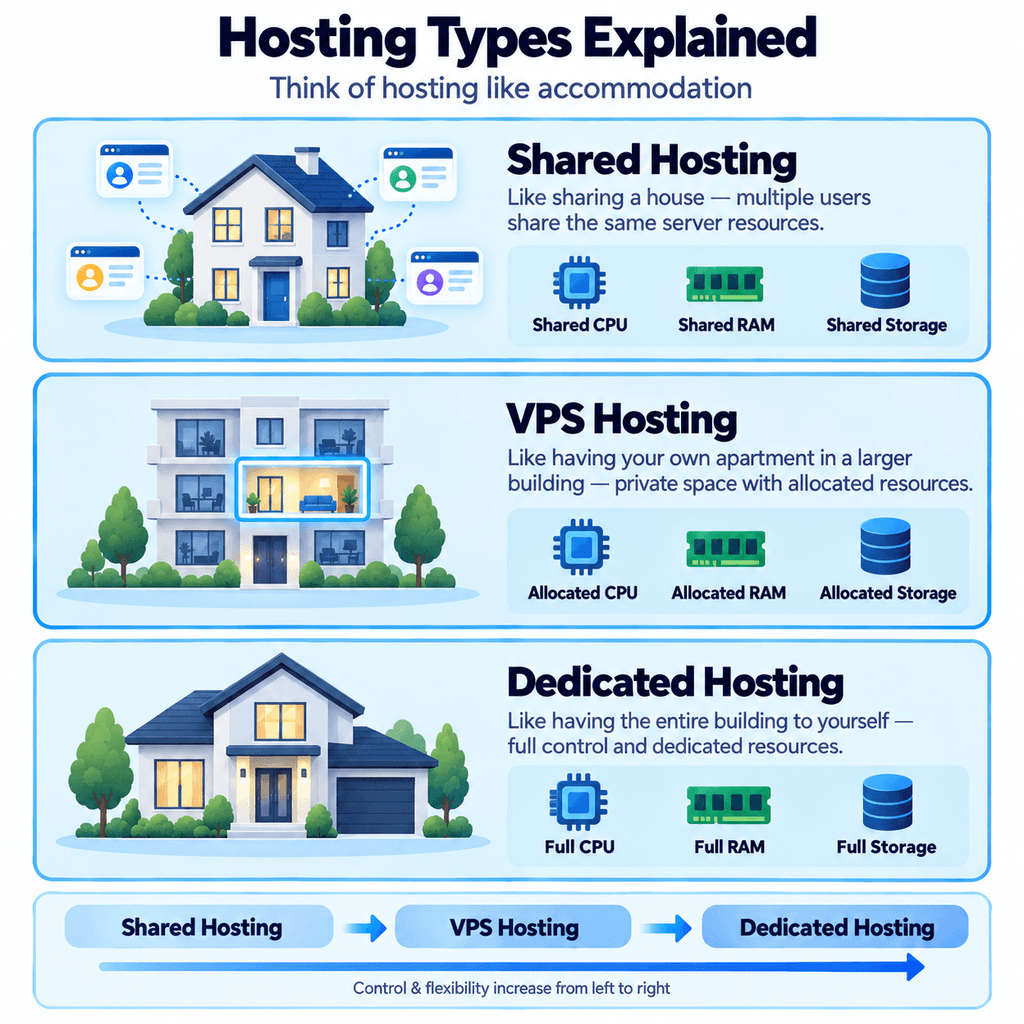
Shared hosting is similar to sharing a house. Several people use the same building and share many of its facilities.
VPS hosting is more like having your own apartment inside an apartment building. You still share the main physical building, but your apartment has its own private space and allocated resources.
Dedicated hosting is like having the entire building to yourself.
This is why VPS hosting is often positioned between shared and dedicated hosting.
It provides more independence and flexibility than shared hosting without requiring the cost or resources of an entire physical server.
Is a VPS a Physical Server?
No.
A VPS is a virtual machine running on a physical server.
Several VPS instances can exist on the same host machine, but virtualization keeps their operating environments separated.
This allows multiple customers to use the same physical infrastructure while maintaining independent server environments.
How Does VPS Hosting Work?
VPS hosting relies on a technology called virtualization.
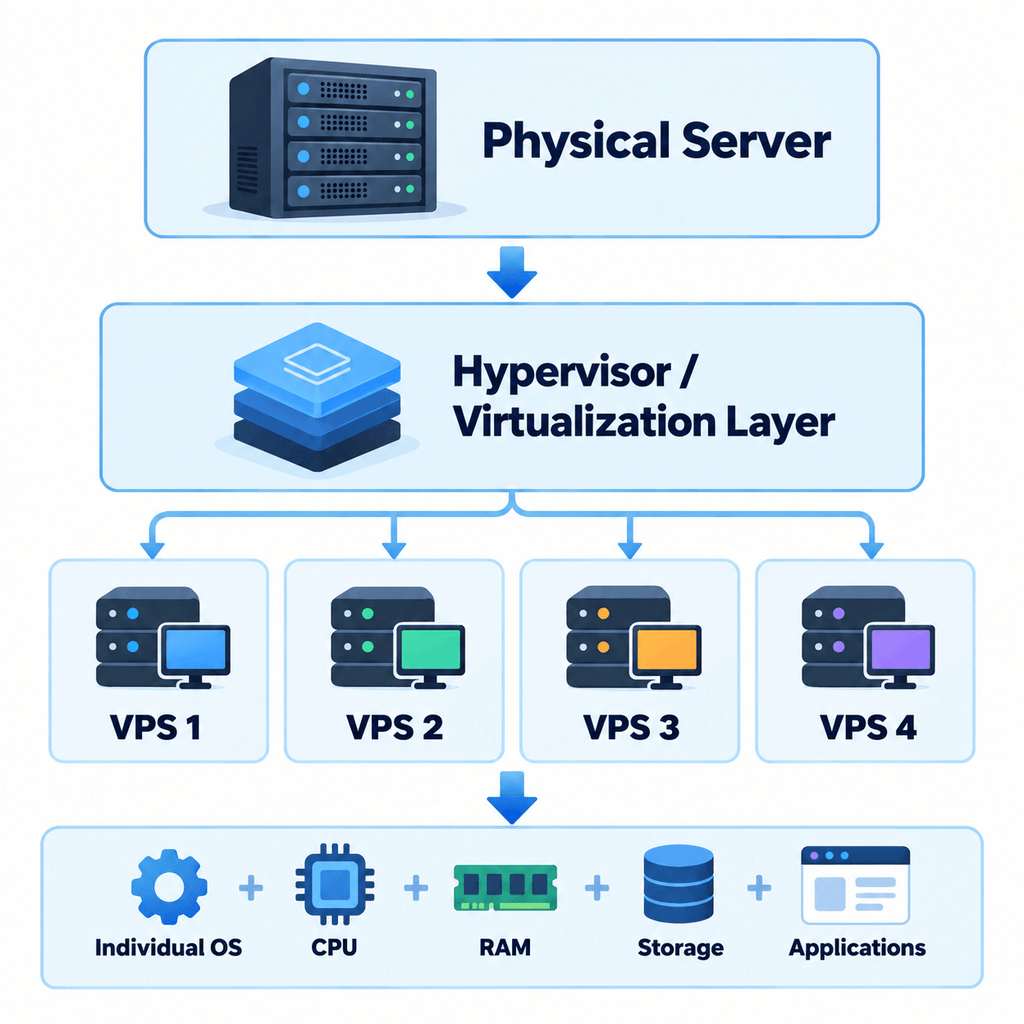
A powerful physical server contains processors, memory, storage, and network connectivity. A virtualization layer divides those physical resources into individual virtual machines.
Each virtual machine becomes a VPS.
A simplified architecture looks like this:
What Is a Hypervisor?
A hypervisor is software or technology that creates and manages virtual machines.
It controls how physical server resources are assigned to each VPS and helps maintain separation between virtual environments.
Common virtualization technologies used by hosting providers include KVM and container-based solutions such as OpenVZ.
The exact virtualization platform varies between providers.
How VPS Resources Work
A VPS plan normally specifies resources such as:
vCPU: Determines how much processing capacity is available to your virtual server.
RAM: Stores data applications need to access quickly. Databases, PHP applications, containers, and active processes all consume RAM.
Storage: Holds your operating system, website files, databases, logs, applications, and backups stored locally.
Bandwidth or data transfer: Determines how much network traffic your server can send or receive under the provider’s plan.
IP address: Allows your VPS to communicate across the internet and can be used for websites, applications, APIs, and other services.
Resource allocation methods vary between hosting platforms, so you should check exactly what a provider guarantees before purchasing.
What Does VPS Isolation Mean?
Each VPS operates separately from other virtual servers on the same physical machine.
You can install applications, configure your operating system, create users, change server settings, and restart your VPS without directly managing another customer’s server.
This isolation is one of the main differences between VPS and conventional shared hosting.
What Can You Use VPS Hosting For?
VPS hosting isn’t limited to hosting normal websites.
Because you have greater control over the server environment, a VPS can support many different workloads.
Websites and WordPress
A VPS can host:
- WordPress websites
- Business websites
- Blogs
- News websites
- Membership sites
- Web portals
VPS hosting becomes particularly useful when a website requires more server resources or configuration flexibility than its current shared hosting environment provides.
WooCommerce and eCommerce Stores
Online stores tend to involve more server-side processing than simple static websites.
A WooCommerce store, for example, may need to process:
- Product searches
- Customer sessions
- Cart activity
- Checkout requests
- Inventory
- Database queries
- Payment integrations
A properly configured VPS gives store owners more control over resources, caching, PHP configuration, databases, and the web server.
However, moving to VPS alone does not automatically make an eCommerce website fast. Application optimization, caching, database performance, plugins, images, network quality, and server configuration still matter.
Node.js, Python, Laravel, and Other Applications
VPS hosting is commonly used when an application requires a custom runtime or persistent server process.
Examples include:
- Node.js
- Express.js
- Python
- Django
- Flask
- FastAPI
- PHP
- Laravel
- Ruby applications
- Java applications
This is useful for developers who cannot run their preferred software stack on standard shared hosting.
APIs and SaaS Applications
A VPS can host:
- REST APIs
- Application backends
- SaaS products
- Authentication services
- Internal business dashboards
- Microservices
You control which runtime, libraries, database, and server software are installed.
Docker and Containers
Developers can also use compatible VPS environments to run Docker containers.
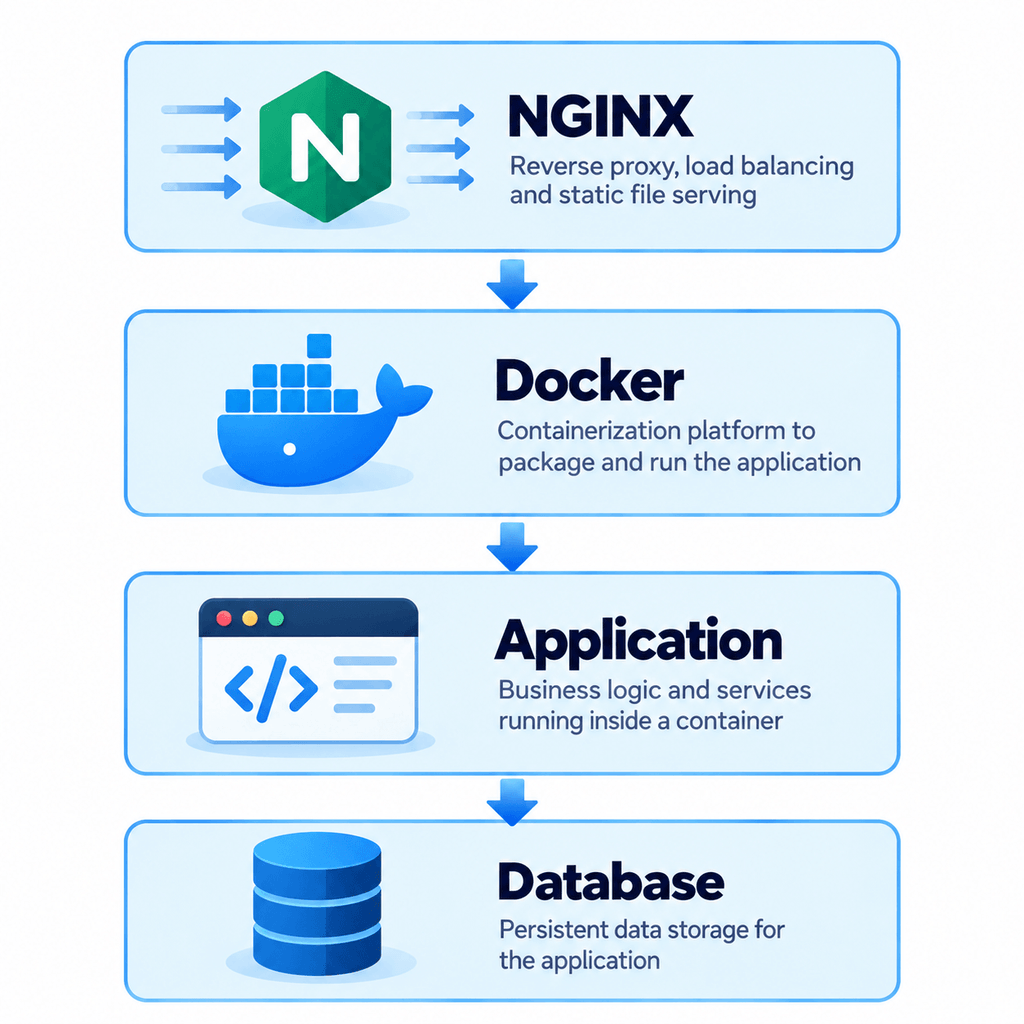
This can make deployment and environment management easier for development teams.
Databases
A VPS can host databases such as:
- MySQL
- MariaDB
- PostgreSQL
- MongoDB
Database servers often benefit from sufficient RAM and fast storage, particularly as databases grow or query workloads increase.
Development and Testing
A VPS can provide an isolated environment for:
- Development
- Staging
- QA testing
- Demo applications
- Test deployments
Developers can reproduce production-like configurations without running everything on their local computer.
Multiple Websites
A single VPS can host multiple websites if its resources, server configuration, software stack, and licensing allow it.
This can be useful for:
- Agencies
- Developers
- Businesses operating several websites
- Resellers
Other VPS Uses
Depending on the provider’s acceptable-use policy and technical limitations, VPS servers may also be used for:
- VPN servers
- Game servers
- Automation tools
- Monitoring systems
- Self-hosted applications
- File management
- Private cloud applications
- Email servers
Running your own email server deserves particular caution because deliverability, DNS configuration, IP reputation, spam prevention, security, SPF, DKIM, and DMARC all require careful management.
VPS Hosting vs Other Types of Hosting
Choosing VPS is easier when you understand where it sits between other hosting options.
VPS vs Shared Hosting
Shared hosting allows multiple customers to use the same server environment with fewer server-level controls.
VPS hosting separates users into independent virtual server environments.
| Feature | Shared Hosting | VPS Hosting |
|---|---|---|
| Server environment | Shared | Isolated virtual environment |
| Resource allocation | Shared | Plan-dependent allocated resources |
| Root access | Usually unavailable | Often available |
| Custom software | Limited | Flexible |
| Technical knowledge | Low | Moderate to high |
| Server configuration | Limited | Extensive |
| Cost | Generally lower | Generally higher |
| Suitable for | Small/simple websites | Growing sites and custom applications |
When Is Shared Hosting Enough?
Shared hosting may still be the better choice if:
- Your website is small
- Your current hosting performs well
- You don’t need custom server software
- You don’t need root access
- You don’t want to manage a server
- Your application works within shared-hosting limits
Moving to VPS simply because it sounds more powerful can add unnecessary complexity.
VPS vs Dedicated Server
A dedicated server gives one customer access to an entire physical machine.
A VPS still shares the underlying physical hardware with other virtual machines.
| Feature | VPS | Dedicated Server |
|---|---|---|
| Physical hardware | Shared | Exclusive |
| Environment | Virtual | Physical server |
| Control | High | Very high |
| Resources | VPS allocation | Entire server |
| Cost | Usually lower | Usually higher |
| Typical use | Growing workloads | Resource-intensive workloads |
A dedicated server can make sense for applications that require substantially more resources, specific hardware requirements, or full physical-server isolation.
VPS vs Cloud Hosting
The terms VPS, cloud VPS, and cloud server are sometimes used differently by hosting providers.
A traditional VPS usually refers to a virtual machine created on a physical host.
Cloud hosting can involve virtual machines running on broader cloud infrastructure designed around distributed computing, storage, networking, automation, or scalability.
The distinction depends heavily on the provider’s architecture, so don’t choose based on the word “cloud” alone.
Compare the actual:
- CPU
- RAM
- Storage
- Network
- Availability architecture
- Backup system
- Scaling options
- Management level
Types of VPS Hosting
There are several ways VPS products can be categorized.
The most important difference for beginners is usually managed vs unmanaged VPS hosting.
Managed VPS Hosting
With managed VPS hosting, the hosting provider handles some server-administration responsibilities.
Depending on the provider, this may include:
- Operating system updates
- Server monitoring
- Security configuration
- Software installation
- Troubleshooting
- Backup management
- Control panel support
However, “managed VPS” does not mean exactly the same thing at every hosting company.
Always check the provider’s management scope before buying.
Unmanaged VPS Hosting
With unmanaged or self-managed VPS hosting, you receive the server infrastructure but handle most server administration yourself.
You may be responsible for:
- Installing software
- Configuring the web server
- Updating the operating system
- Configuring SSH
- Managing users
- Setting firewall rules
- Securing applications
- Monitoring resources
- Troubleshooting
- Configuring backups
Unmanaged VPS is suitable for developers, system administrators, and technically experienced users who want maximum control.
Managed vs Unmanaged VPS
| Area | Managed VPS | Unmanaged VPS |
|---|---|---|
| Technical responsibility | Lower | Higher |
| Server control | High | Very high |
| Maintenance | Provider assists/manages | Customer manages |
| Technical knowledge | Lower requirement | Higher requirement |
| Cost | Usually higher | Usually lower |
| Best suited for | Businesses and non-admin users | Developers and administrators |
Linux VPS vs Windows VPS
Another important choice is the operating system.
A Linux VPS may offer distributions such as:
- Ubuntu
- Debian
- AlmaLinux
- Rocky Linux
Availability varies by provider.
Windows VPS generally uses Windows Server and may be appropriate for workloads that depend on Microsoft technologies or Windows-specific applications.
Choose the operating system based on your application requirements rather than simply choosing the one you are most familiar with.
Advantages and Disadvantages of VPS Hosting
VPS hosting provides considerably more flexibility than basic shared hosting, but that flexibility comes with additional responsibility.
Advantages of VPS Hosting
More control
You can configure server software according to your application’s requirements.
Root or administrator access
Many VPS platforms allow elevated administrative control.
Custom software
You can install runtimes, databases, web servers, development tools, and other supported software.
Isolated environment
Your operating environment is separated from other VPS customers.
Allocated resources
VPS plans generally assign specific CPU, memory, and storage resources to your virtual machine according to the provider’s architecture.
Better suitability for custom applications
VPS is often more appropriate than shared hosting for Node.js, Python, Docker, APIs, SaaS platforms, databases, and similar workloads.
Ability to scale
Many providers allow users to upgrade CPU, RAM, or storage as their requirements grow.
The exact scaling process varies by platform.
Disadvantages of VPS Hosting
Higher cost than entry-level shared hosting
VPS normally requires more infrastructure and therefore generally costs more.
More technical knowledge
Unmanaged VPS hosting requires familiarity with server administration.
Security responsibility
Root access gives you greater control, but it also means misconfiguration can create security problems.
Maintenance requirements
Servers need updates, monitoring, backups, and maintenance.
Resources are still limited
A VPS is not an unlimited server.
CPU, RAM, storage, bandwidth, and other resources still have limits.
Poor configuration can cause problems
Buying more RAM or CPU cannot compensate for every application, database, caching, or configuration problem.
When Should You Upgrade to VPS Hosting?
You don’t need VPS hosting simply because your website receives visitors.
Upgrade when your hosting requirements justify it.
You may want to consider VPS hosting when:
- Your website regularly reaches hosting resource limits
- Your application requires more RAM or CPU
- You need root access
- You need custom software
- Shared hosting doesn’t support your runtime
- You want to run Node.js or Python applications
- You need Docker
- You operate multiple websites
- You need custom server configuration
- Your eCommerce workload has increased
- You need greater control over caching or databases
- Shared hosting restrictions are preventing development
When You Probably Don’t Need VPS Yet
You may be better staying with shared hosting if:
- Your existing website performs well
- Your resource requirements are small
- You run a simple company website
- You don’t need root access
- You don’t need custom applications
- You don’t want server-management responsibilities
The right hosting solution is the one that meets your application’s requirements—not necessarily the one with the highest specifications.
How to Choose the Right VPS Hosting
Choosing a VPS shouldn’t start with the cheapest plan or the largest RAM number.
Start with your workload.
1. Decide What You Want to Host
Different workloads place pressure on different server resources.
For example:
A database may need plenty of RAM and fast storage.
A CPU-intensive application may benefit from more processing capacity.
A file server may depend more heavily on storage and network transfer.
Understanding your workload makes the rest of the selection process easier.
2. Check the vCPU
vCPU represents virtual processing capacity.
CPU performance matters for tasks such as:
- Dynamic page generation
- Application processing
- Database queries
- Background jobs
- Compiling software
- High request volumes
Don’t choose a VPS only by counting vCPU cores. CPU architecture, allocation method, clock performance, host load, and virtualization also influence actual performance.
3. Choose Enough RAM
RAM is particularly important for:
- Databases
- WordPress
- WooCommerce
- Containers
- Caching
- Multiple applications
- High concurrency
Running out of memory can slow applications or cause services to stop.
At the same time, buying excessive RAM for a small application wastes money.
4. Check Storage Type and Capacity
Consider both:
Storage capacity: How much data can you store?
Storage performance: How quickly can applications read and write data?
VPS plans may use SSD or NVMe SSD storage.
NVMe can provide lower latency and higher input/output performance than older SATA-based storage, but the overall application speed still depends on the complete infrastructure and software stack.
5. Check Bandwidth and Data Transfer
Bandwidth and data-transfer allowance are not necessarily the same thing.
Check:
- Network port speed
- Monthly transfer allowance
- Inbound and outbound traffic rules
- Overage policies
- Network quality
This becomes especially important for media-heavy websites, downloads, backups, APIs, or applications serving large amounts of data.
6. Choose the Right Server Location
Server location can affect network latency.
If most of your users are in Nepal, test the provider’s network performance from Nepal instead of assuming that the geographically closest server will always perform best.
Routing and peering can also affect latency.
VPS Hosting in Nepal: What Should You Consider?
For a Nepal-focused website or application, consider:
- Where your visitors are located
- Network latency from Nepal
- Data center location
- Provider support hours
- Available payment methods
- Managed support options
- Backup availability
- Network reliability
- Application requirements
Claims such as “Nepal-optimized routing” or guaranteed local latency should be supported by real testing before publication.
[FACT CHECK REQUIRED: Verify Prabhu Host’s current VPS data center locations, network routing, payment methods, support availability, and latency claims before adding provider-specific statements.]
7. Managed or Unmanaged?
Choose unmanaged VPS if you are comfortable administering Linux or Windows servers yourself.
Choose managed VPS if you need help with infrastructure management.
Before buying, confirm exactly what the provider manages.
8. Check Backup Options
Ask:
- Are backups included?
- Are they automatic?
- How frequently do they run?
- How long are they retained?
- Where are they stored?
- Can you restore them yourself?
- Are backups included in the VPS price?
Snapshots should not automatically be treated as a complete backup strategy.
9. Check Root Access
If you need custom server configuration, check whether full root or administrator access is available.
10. Check Control Panel Options
Popular server-control panels can include:
- cPanel/WHM
- Plesk
- DirectAdmin
Control panels may require additional licenses, depending on the provider.
You can also run a VPS without a commercial control panel if you are comfortable managing it directly.
11. Understand Support
One of the most overlooked VPS considerations is the difference between:
Infrastructure support
and
application/server administration support.
A hosting company may ensure that the physical server and network operate correctly while leaving your NGINX configuration, application errors, database tuning, or firewall settings to you.
Check what is actually included.
How Much VPS Hosting Do You Need?
There is no reliable formula such as:
“X GB RAM supports exactly Y visitors.”
Two websites receiving the same number of visitors can have completely different resource requirements.
VPS sizing depends on:
- Application architecture
- Concurrent users
- Database size
- Caching
- Plugins
- Background tasks
- Software stack
- Traffic patterns
- Image and file processing
- Optimization
- Number of applications
A more useful way to think about VPS sizing is by workload.
| Workload | Resources That Often Matter Most |
|---|---|
| WordPress | CPU, RAM, storage performance |
| WooCommerce | CPU, RAM, database performance |
| Node.js application | CPU/RAM depending on workload |
| Python application | CPU/RAM depending on workload |
| Database server | RAM and storage I/O |
| Docker | CPU and RAM |
| File hosting | Storage and bandwidth |
| Game server | CPU, RAM, network latency |
Start With Real Usage Where Possible
If you’re migrating from another hosting platform, review your existing:
- CPU usage
- RAM usage
- Disk usage
- Traffic
- Database size
- Peak activity
- Bandwidth consumption
Then select a VPS with enough headroom for realistic growth.
Monitoring after deployment is just as important as selecting the initial plan.
VPS Security, Setup, and Migration
Buying a VPS is only the beginning.
After provisioning the server, you need to configure, secure, deploy, monitor, and maintain it.
What Happens After You Buy a VPS?
A typical process looks like:
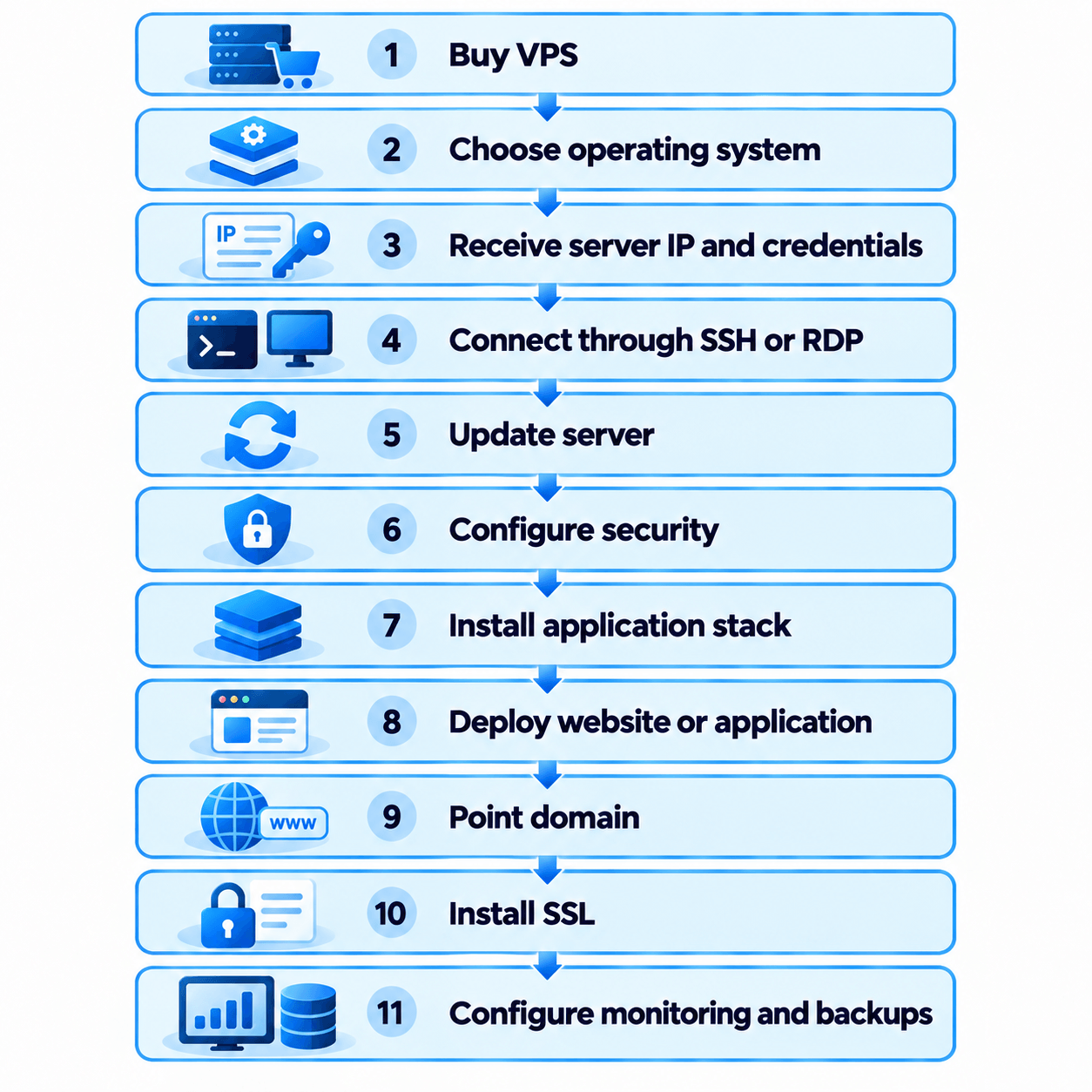
Connecting to a Linux VPS
Linux servers are commonly accessed using SSH.
A basic connection looks like:
ssh username@server-ip
The exact username and authentication method depend on your provider and server configuration.
SSH keys are generally preferable to relying solely on password authentication when correctly configured.
Connecting to Windows VPS
Windows servers are often managed using Remote Desktop Protocol (RDP).
Your hosting provider normally supplies the required IP address and administrator credentials.
Essential VPS Security Practices
A new VPS should be secured before hosting important production workloads.
Common practices include:
- Update the operating system
- Install security patches
- Use strong authentication
- Configure SSH securely
- Use SSH keys where appropriate
- Configure a firewall
- Close unnecessary ports
- Disable unnecessary services
- Limit administrator/root access
- Keep applications updated
- Monitor logs
- Configure backups
- Monitor CPU, RAM, disk, and network usage
Security requirements differ depending on what you’re hosting.
A public web application, database server, VPN, and internal development environment may require different security policies.
Backups vs Snapshots
Backups and snapshots are related but should not always be treated as identical.
A snapshot typically captures the state of a virtual server or disk at a particular point in time.
A backup is generally a recoverable copy of important data stored according to a backup strategy.
Provider implementations vary.
For important production workloads, understand exactly where backups are stored and what happens if the primary server or account becomes unavailable.
How to Point a Domain to VPS Hosting
The basic process normally looks like:
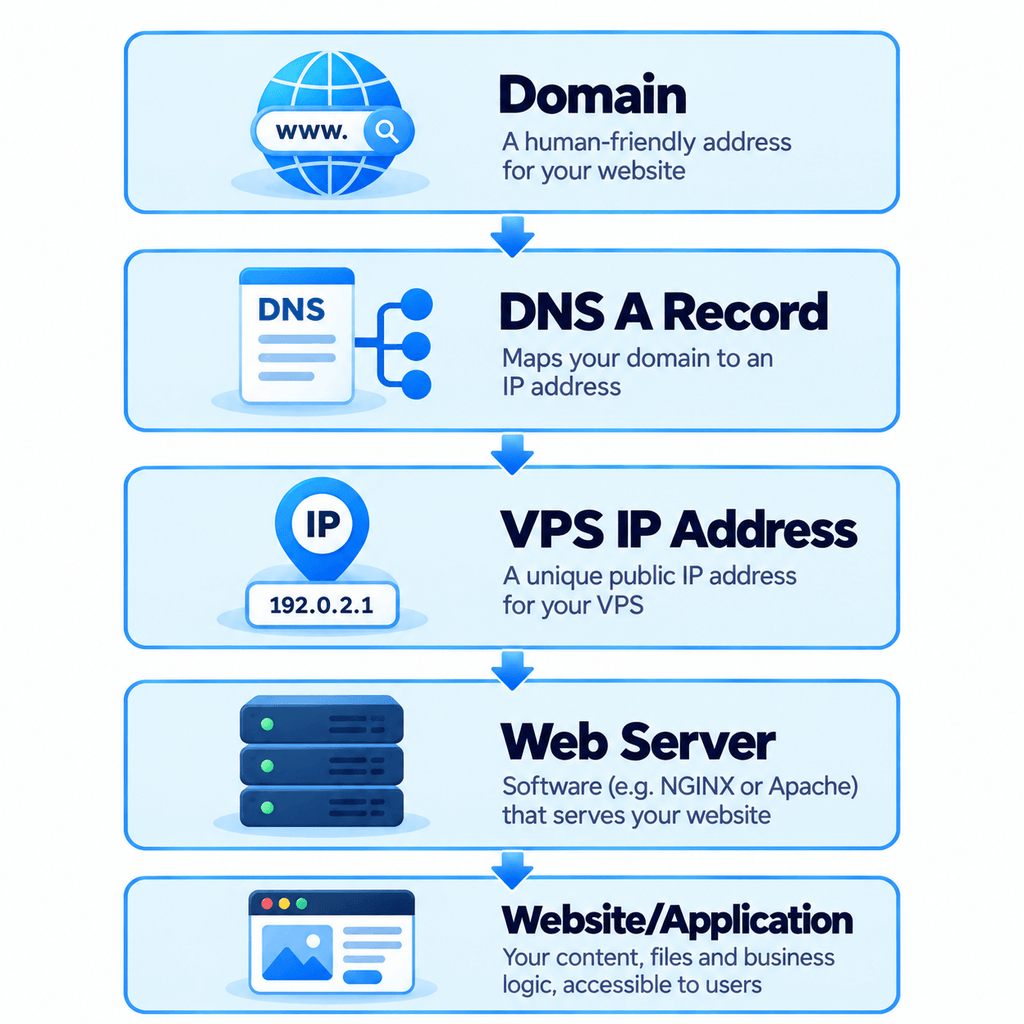
After changing DNS, you configure your web server to respond to the domain and install an SSL certificate.
Migrating From Shared Hosting to VPS
A typical migration includes:
- Back up the existing website.
- Provision and secure the VPS.
- Install the required software stack.
- Transfer website files.
- Export and import the database.
- Reconfigure environment settings.
- Migrate email separately if required.
- Test the website before changing DNS.
- Update DNS records.
- Confirm HTTPS and SSL.
- Monitor logs and application performance after launch.
Do not cancel the old hosting immediately after changing DNS. Keeping it available temporarily can make rollback easier if a problem appears.
Common VPS Mistakes to Avoid
Avoid:
- Choosing a VPS based only on RAM
- Ignoring CPU performance
- Buying an unmanaged VPS without sufficient technical knowledge
- Leaving unnecessary ports open
- Running everything as root
- Skipping backups
- Assuming snapshots replace proper backups
- Ignoring monitoring
- Failing to update server software
- Installing unnecessary applications
- Choosing a server solely because it is cheap
- Assuming more VPS resources will automatically fix a slow website
A poorly optimized application can remain slow even on powerful infrastructure.
Frequently Asked Questions About VPS Hosting
What is VPS hosting in simple words?
VPS hosting gives you a private virtual server environment inside a larger physical server. You receive allocated server resources and greater control over the operating system and software than you normally get with shared hosting.
What does VPS stand for?
VPS stands for Virtual Private Server.
“Virtual” means the server is created through virtualization rather than being a separate physical machine. “Private” refers to its isolated server environment.
Is VPS better than shared hosting?
Not always.
VPS gives you more control and generally more flexible server resources, while shared hosting is simpler and usually costs less.
A small website that performs well on shared hosting may not benefit from moving to VPS.
Is VPS hosting faster than shared hosting?
It can provide more predictable resources and greater optimization flexibility, but VPS hosting is not automatically faster.
Actual performance depends on CPU, RAM, storage, network, caching, database configuration, software, application code, traffic, and server optimization.
Is VPS hosting secure?
VPS provides an isolated server environment, but security depends heavily on configuration.
The operating system, firewall, authentication, applications, patches, backups, and access policies all need to be managed correctly.
Do I need VPS hosting for WordPress?
Not necessarily.
Many small WordPress websites work well on shared or managed WordPress hosting.
VPS becomes useful when you need additional resources, server-level customization, multiple websites, or greater control over the hosting environment.
Can WooCommerce run on VPS hosting?
Yes.
WooCommerce can run on a VPS when the required WordPress, PHP, database, web server, and supporting components are correctly configured.
Can I host multiple websites on one VPS?
Yes, provided your VPS has sufficient resources and your server configuration supports multiple websites.
Can I run Node.js on VPS?
Yes.
One of the common reasons developers choose VPS hosting is the ability to install Node.js, run persistent applications, configure NGINX or another reverse proxy, and manage application processes.
Can I run Python or Django on a VPS?
Yes.
You can install Python and deploy frameworks such as Django, Flask, or FastAPI using a suitable application server and web-server configuration.
Can I run Docker on VPS?
Generally yes, provided the VPS virtualization technology, operating system, and hosting provider support it.
Do I need coding knowledge to use VPS hosting?
You don’t necessarily need to be a programmer, but unmanaged VPS hosting requires server-administration knowledge.
You should understand concepts such as SSH, software installation, updates, firewalls, logs, file permissions, backups, and server troubleshooting.
Managed VPS reduces some of that responsibility.
What is root access?
Root is the highest administrative privilege on Linux systems.
Root access allows you to modify system-level configurations, install software, manage users, change network settings, and control most aspects of the server.
That power should be used carefully.
Is VPS the same as VPN?
No.
VPS = Virtual Private Server
VPN = Virtual Private Network
A VPS is a virtual computing server.
A VPN creates an encrypted network connection between devices or networks.
A VPS can potentially be used to host VPN software, but they are different technologies.
Is VPS the same as cloud hosting?
Not necessarily.
Both can use virtualization, but cloud infrastructure may use a broader distributed architecture.
Because hosting companies use these terms differently, compare the actual infrastructure and features rather than choosing solely based on the product name.
How much RAM does a VPS need?
It depends on your workload.
A small web application and a large WooCommerce store can have very different requirements even if both receive similar traffic.
Measure application usage and consider database size, concurrent visitors, caching, background processes, containers, and future growth.
Managed or unmanaged VPS: which should I choose?
Choose managed VPS if you want help with server administration and don’t have the expertise or time to manage infrastructure yourself.
Choose unmanaged VPS if you are comfortable configuring, securing, updating, monitoring, and troubleshooting the server.
Conclusion: Is VPS Hosting Right for You?
VPS hosting provides a useful middle ground between basic shared hosting and a full dedicated server.
You receive an isolated virtual server environment, allocated computing resources, greater configuration freedom, and the ability to install software that standard shared hosting may not support.
But VPS isn’t automatically the correct choice for every website.
Stay with shared hosting if your website is small, performs well, and doesn’t require custom server configuration.
Consider VPS hosting when you need:
- More server resources
- Greater control
- Root access
- Custom applications
- Node.js or Python
- Docker
- Multiple websites
- Custom databases
- Flexible server configuration
And if you need those capabilities but don’t want to manage the server yourself, a managed VPS may be worth considering.
For businesses and developers looking for VPS hosting in Nepal, compare providers based on actual CPU, RAM, storage, network performance, server location, backup options, security, support scope, and management level—not only headline pricing.