

Introduction
Node.js is widely used to build modern web applications, APIs, SaaS platforms, real-time applications, dashboards, and backend services.
Building the application, however, is only part of the job.
To make your Node.js application available online, you need a hosting environment capable of keeping it running reliably. And that environment is slightly different from traditional web hosting.
That is where Node.js hosting comes in.
Node.js hosting provides the server resources, runtime environment, networking, and application management tools required to deploy and run Node.js applications on the internet.
Depending on the hosting solution, you may also get access to Node.js version management, npm packages, SSH, Git deployment, process managers, databases, SSL certificates, monitoring, backups, and scaling options.
In this guide, we’ll explain what Node.js hosting is, how it works, why it differs from regular web hosting, the different types available, and how to choose the right Node.js hosting for your application.
What Is Node.js Hosting?
Node.js hosting is a hosting environment designed to run server-side applications built using Node.js.
Node.js is a JavaScript runtime that allows developers to execute JavaScript outside the browser.
That means JavaScript can be used not only for buttons, animations, and other frontend features but also for backend tasks such as:
- Processing requests
- Connecting to databases
- Authenticating users
- Building APIs
- Processing payments
- Handling real-time connections
- Running background jobs
- Communicating with external services
Once your application is ready, Node.js hosting provides the server where that application can run continuously and be accessed by users over the internet.
A typical production setup might look like:
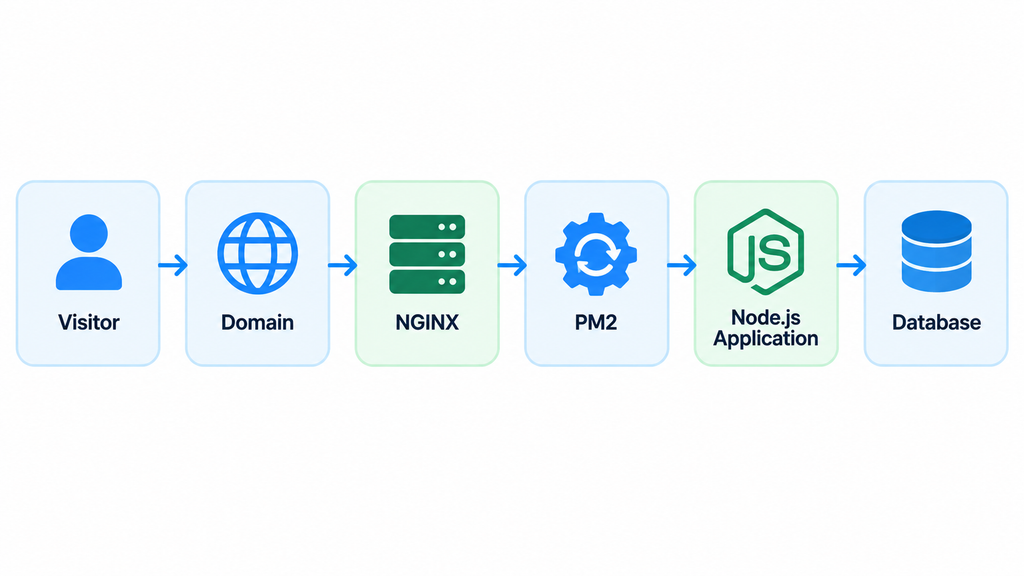
Each component has a different role.
Domain
Gives visitors an easy-to-remember web address.
NGINX
Receives incoming requests and forwards them to your Node.js application.
PM2
Keeps the Node.js process running and can restart it when necessary.
Node.js application
Handles your application’s logic and requests.
Database
Stores information such as users, products, orders, messages, or application data.
You don’t necessarily need every component for every project, but this architecture is common when hosting Node.js applications on a VPS.
What Is Node.js?
Before looking deeper into hosting, it helps to understand why Node.js needs a particular type of server environment.
JavaScript was originally designed to run inside web browsers.
Node.js made it possible to execute JavaScript on the server.
Instead of using PHP, Python, Java, or another backend language, developers can use JavaScript to create the server-side part of an application.
One of the important characteristics of Node.js is that an application normally runs as a persistent process.
For example:
const express = require("express");

const app = express();

app.get("/", (req, res) => {
  res.send("Hello from Node.js");
});

app.listen(3000);
When this application starts, it doesn’t shut down after serving one visitor.
It continues running and listening for new requests.
This is one of the main reasons Node.js hosting differs from traditional web hosting.
Why Is Node.js Hosting Different From Regular Web Hosting?
Traditional shared hosting is commonly designed around technologies such as PHP.
With traditional PHP hosting, the server can execute a script when a request arrives, return the result, and finish that request.
Node.js applications typically behave differently.
A Node.js application remains active in memory and continues listening for incoming requests.
This allows it to handle things such as:
- Persistent connections
- WebSockets
- Real-time updates
- API requests
- Background services
- Long-running application processes
Because of this, Node.js hosting needs to support persistent application processes.
Your host may also need to provide access to:
- Node.js runtime versions
- npm or Yarn
- Custom application ports
- Environment variables
- Process management
- SSH
- Reverse proxy configuration
- Git repositories
- Databases
- Application logs
A basic shared hosting account may not provide this level of control.
Node.js Hosting vs Traditional Shared Hosting
| Feature | Traditional Shared Hosting | Node.js Hosting |
|---|---|---|
| PHP hosting | Yes | May be available |
| Node.js runtime | Limited or unavailable | Yes |
| npm packages | Often limited | Supported |
| Persistent processes | Usually restricted | Supported |
| Node.js version selection | Limited | Usually available |
| SSH access | Limited | Common |
| Custom application ports | Restricted | Supported depending on platform |
| PM2/process manager | Usually unavailable | Common on VPS |
| Root access | No | Available with VPS |
| NGINX configuration | Provider-controlled | Customizable on VPS |
| Git deployment | Varies | Common |
| WebSocket support | Limited | Commonly supported |
| Server configuration | Restricted | Flexible |
For a basic website, traditional hosting may be enough.
For an API, SaaS platform, real-time application, or custom Node.js backend, a Node.js-compatible environment is usually the better choice.
How Does Node.js Hosting Work?
Let’s look at what happens when somebody visits a Node.js application hosted on a VPS.
Imagine your application is available at:
https://example.com
When someone opens the website, the request follows a path similar to this:
Visitor
   ↓
Domain / DNS
   ↓
NGINX
   ↓
Node.js Application
   ↓
Database
In a production environment, a process manager may also sit between the operating system and your application:
Visitor
   ↓
NGINX
   ↓
PM2
   ↓
Node.js Application
   ↓
Database
Here’s what happens.
1. The Visitor Opens Your Domain
The visitor enters your domain name into their browser.
DNS points the domain toward the IP address of your hosting server.
2. The Request Reaches the Server
NGINX receives the incoming HTTP or HTTPS request.
NGINX can handle tasks such as:
- SSL termination
- Reverse proxying
- Static content
- Compression
- Request routing
- Load balancing
3. NGINX Sends the Request to Node.js
Your Node.js application may be running internally on:
127.0.0.1:3000
NGINX forwards the visitor’s request to that application.
4. Node.js Processes the Request
Your application performs the required work.
For example, it might:
- Check a user’s login
- Fetch products from a database
- Process an API request
- Store a message
- Generate a dashboard
- Call an external API
5. The Response Is Returned
Node.js sends the response back through NGINX, which delivers it to the user’s browser.
This entire process can happen in milliseconds.
What Can You Host With Node.js?
Node.js isn’t limited to traditional websites.
It can power many different types of applications.
REST APIs
APIs are one of the most common Node.js use cases.
For example:
Mobile App → Node.js API → Database
or:
React Frontend → Node.js API → Database
Frameworks such as Express, Fastify, and NestJS are commonly used to create Node.js APIs.
Node.js works particularly well for applications that regularly communicate with databases, third-party APIs, and other services.
Express.js Applications
Express is a lightweight web framework for Node.js.
Developers can use it to build:
- REST APIs
- Backend applications
- Authentication systems
- Admin dashboards
- Web applications
- Microservices
Express applications generally run as persistent processes, making VPS and managed Node.js hosting common deployment options.
Next.js Applications
Next.js is a React framework used to build modern websites and applications.
Some Next.js projects can be exported as static websites.
However, applications using features such as server-side rendering or server functionality may require a Node.js runtime.
A Node.js-compatible hosting environment can therefore be used to self-host Next.js applications.
SaaS Applications
Node.js is well suited to Software-as-a-Service applications.
A typical SaaS architecture might look like:
Frontend
   ↓
Node.js Backend
   ↓
Authentication
   ↓
Database
   ↓
Payment / Email / API Services
Examples include:
- CRM platforms
- Project management tools
- Analytics dashboards
- Subscription services
- Business applications
- AI-powered applications
Real-Time Applications
Node.js is commonly used for applications that require continuous communication between the browser and server.
Examples include:
- Live chat
- Messaging applications
- Multiplayer applications
- Live notifications
- Collaboration tools
- Real-time dashboards
- Location tracking
- Live monitoring systems
Technologies such as WebSockets and Socket.IO are often used for these applications.
E-Commerce Backends
Node.js can be used to build custom e-commerce systems that manage:
- Customer accounts
- Product catalogs
- Shopping carts
- Payments
- Inventory
- Orders
- Notifications
- External integrations
A Node.js API can also provide backend services to mobile applications and frontend frameworks.
Microservices
Instead of building one large application, developers can divide functionality into smaller independent services.
For example:
Authentication Service
        ↓
Order Service
        ↓
Payment Service
        ↓
Notification Service
        ↓
Analytics Service
Each service can run independently.
Node.js is frequently used for microservices because applications can be relatively lightweight and easy to deploy.
AI Application Backends
Node.js can also act as the backend layer for AI-powered applications.
For example:
User
 ↓
Web Application
 ↓
Node.js API
 ↓
AI Service / Model API
 ↓
Database
Node.js can manage authentication, user sessions, API requests, billing, streaming responses, and connections between your frontend and AI services.
Automation and Background Workers
Not every Node.js workload serves a website.
You can also use Node.js for:
- Cron jobs
- Queue workers
- Data processing
- Bots
- Webhooks
- Email processing
- Automated reports
- API integrations
- Background tasks
A VPS can be particularly useful for workloads that need to stay active continuously.
Types of Node.js Hosting
There are several ways to host a Node.js application.
The best option depends on your technical experience, application architecture, traffic, budget, and how much server management you want to handle.
1. Shared Node.js Hosting
Some shared hosting providers allow Node.js applications.
This can be suitable for:
- Learning Node.js
- Small projects
- Development websites
- Personal applications
- Low-traffic websites
However, shared hosting usually provides limited control over the server.
You may face restrictions on:
- RAM
- CPU
- Application ports
- Long-running processes
- Node.js versions
- System packages
- Background workers
As your application grows, these limitations can become important.
2. Node.js VPS Hosting
A Virtual Private Server gives you an isolated virtual server environment with dedicated resources and greater control.
You can typically configure:
- Node.js
- npm
- PM2
- NGINX
- PostgreSQL
- MySQL
- MongoDB
- Redis
- Docker
- Git
- Firewalls
- Monitoring tools
A common configuration might be:
Ubuntu VPS
    ↓
NGINX
    ↓
PM2
    ↓
Node.js
    ↓
PostgreSQL
VPS hosting is particularly useful when you need:
- Root access
- Custom software
- Persistent processes
- Multiple applications
- Background workers
- Custom server configuration
- Predictable server resources
The trade-off is that an unmanaged VPS normally requires you to manage the operating system, security, updates, backups, and application configuration yourself.
3. Managed Node.js Hosting
Managed hosting reduces the infrastructure work required to run your application.
Depending on the provider, the platform may handle things such as:
- Server provisioning
- Security updates
- SSL
- Monitoring
- Process management
- Backups
- Deployment tools
- Server configuration
Instead of configuring the entire server manually, you can focus more on your application.
Managed Node.js hosting can be useful for:
- Startups
- Agencies
- SaaS businesses
- Developers without DevOps experience
- Businesses that don’t want to maintain servers
The trade-off is generally less low-level control compared with managing your own VPS.
4. Serverless Node.js Hosting
Serverless platforms allow developers to deploy functions or applications without directly managing a traditional server.
Infrastructure is handled by the platform.
Serverless hosting can work particularly well for:
- Small APIs
- Prototypes
- Event-driven applications
- Lightweight backend functions
- Applications with unpredictable traffic
However, serverless platforms may introduce limitations depending on the provider, including:
- Execution time limits
- Runtime restrictions
- Cold starts
- Usage-based pricing
- Restrictions on persistent connections
- Less infrastructure control
For applications requiring always-on processes, WebSockets, background services, or predictable infrastructure, a VPS or managed persistent server may be more suitable.
5. Edge Hosting
Edge computing runs application logic closer to users through geographically distributed infrastructure.
The main advantage is lower latency.
Edge hosting can work well for:
- Globally distributed applications
- Authentication middleware
- Personalization
- Lightweight APIs
- Low-latency workloads
However, edge environments frequently have different runtime limitations than a normal Node.js server.
Not every Node.js package or application architecture can run unchanged at the edge.
Node.js Hosting Types Compared
| Hosting Type | Server Control | Management Required | Best For |
|---|---|---|---|
| Shared Hosting | Low | Low | Small projects |
| VPS Hosting | Very High | High | Developers and production apps |
| Managed Hosting | Medium | Low | Businesses and teams |
| Serverless | Low | Very Low | Functions and lightweight applications |
| Edge Hosting | Low-Medium | Low | Low-latency distributed workloads |
There isn’t one hosting type that is best for every project.
Your application’s architecture should determine your hosting choice.
VPS vs Serverless Node.js Hosting
This is becoming an increasingly important decision for Node.js developers.
Serverless platforms make deployment extremely easy.
You can often connect a repository and deploy within minutes.
For prototypes and smaller applications, that’s a major advantage.
But an always-on VPS works differently.
With a VPS, your Node.js process can remain continuously active:
Node.js Process
     ↓
Always Running
     ↓
Ready for Requests
Serverless environments usually execute workloads according to the platform’s function model.
Consider Serverless When:
- You are building a prototype
- Traffic is relatively light
- You don’t want to manage servers
- Your functions execute quickly
- Your architecture fits the platform’s runtime
- Easy deployment is the priority
Consider a VPS When:
- Your application needs persistent processes
- You use WebSockets
- You run workers or queues
- You need custom system software
- You want full server control
- You want to host several applications
- You need predictable infrastructure resources
- You need root access
Neither model is automatically better.
The right choice depends on the application.
What to Look for in Node.js Hosting
Price matters, but it shouldn’t be the only factor when selecting a Node.js hosting provider.
The following features can have a much larger impact on development and production reliability.
Supported Node.js Versions
Your hosting environment should support the Node.js version required by your project.
Ideally, you should be able to upgrade or switch versions when required.
This becomes even more useful if you host multiple applications that require different Node.js versions.
npm and Package Management
Most Node.js applications rely on npm packages.
Your hosting environment should allow commands such as:
npm install
You may also want support for Yarn or pnpm depending on your workflow.
SSH Access
SSH allows developers to manage the server from the command line.
You can use SSH to:
- Deploy code
- Install packages
- Configure applications
- Read logs
- Restart services
- Manage Git repositories
- Update server software
SSH access is especially important on developer-focused VPS hosting.
Git Deployment
A modern deployment workflow frequently starts with Git.
Instead of manually uploading files after every update, you can deploy directly from your repository.
A workflow might look like:
Developer
   ↓
Git Repository
   ↓
VPS / Hosting Platform
   ↓
Node.js Application
A simple Git-based deployment process can save considerable time when applications are updated frequently.
Process Management
Your Node.js application needs to stay running.
On a VPS, process managers such as PM2 can help with this.
PM2 can:
- Start applications
- Restart crashed processes
- Run applications after reboot
- Manage multiple applications
- Store logs
- Monitor application processes
For example:
pm2 start app.js
pm2 save
Process management is one of the most important differences between hosting Node.js and hosting a basic static website.
Deployment Reliability
Updating an application should cause as little disruption as possible.
For production systems, look for deployment features or architectures that help minimize downtime during updates.
This becomes particularly important for:
- APIs
- SaaS applications
- E-commerce
- Business platforms
- Applications with active users
CPU and RAM
Your server needs enough processing power and memory for the application.
Resource requirements depend on:
- Number of visitors
- Concurrent connections
- Background workers
- Application architecture
- Database workloads
- Number of Node.js processes
Start with enough resources for your current workload while keeping an upgrade path available.
NVMe SSD Storage
Fast storage can improve:
- Application startup
- Database operations
- File access
- Package installation
- Logging
- General server responsiveness
NVMe SSD storage is therefore worth considering for performance-focused Node.js VPS hosting.
Root Access
Root access gives you control over the server environment.
You can install technologies such as:
Node.js
NGINX
PM2
Docker
Redis
MongoDB
PostgreSQL
MySQL
Monitoring Tools
This makes VPS hosting considerably more flexible than traditional shared hosting.
SSL Certificates
Production websites and APIs should use HTTPS.
Make sure your hosting environment allows you to install and automatically renew SSL certificates.
A production application should normally be accessible through:
https://example.com
rather than plain HTTP.
WebSocket Support
If you’re building:
- Chat applications
- Live dashboards
- Multiplayer applications
- Collaboration tools
- Real-time notification systems
check whether your hosting environment supports persistent WebSocket connections.
Backups
Backups provide a recovery path when something goes wrong.
Depending on your application, consider backing up:
- Application files
- Databases
- Uploaded content
- Configuration
- Server data
Automated backups can significantly simplify recovery.
Security
Your hosting provider should give you the infrastructure necessary to secure your server and application.
Look for features such as:
- Firewall support
- DDoS protection
- SSL
- Server monitoring
- Security updates
- Private networking where applicable
- Backup options
Security should also be implemented at the application level.
Scalability
A small application may not need much computing power today.
That can change quickly.
Choose infrastructure that allows you to increase:
- RAM
- CPU
- Storage
- Bandwidth
without rebuilding your entire environment unnecessarily.
Why VPS Hosting Is Popular for Node.js Applications
VPS hosting offers an attractive balance between cost, control, performance, and flexibility.
Unlike shared hosting, developers can configure the server according to the application.
A single VPS could potentially run:
NGINX
Node.js
PM2
PostgreSQL
Redis
Docker
Monitoring
Firewall
You can also host multiple Node.js applications on the same server.
For example:
api.example.com
      ↓
localhost:3001

app.example.com
      ↓
localhost:3002

admin.example.com
      ↓
localhost:3003
NGINX can route each domain or subdomain to the correct internal Node.js application.
This gives developers considerable flexibility without requiring a dedicated physical server.
How to Host a Node.js Application on a VPS
A typical Node.js VPS deployment follows the steps below.
Step 1: Choose a VPS
Select a VPS with enough:
- CPU
- RAM
- NVMe or SSD storage
- Bandwidth
Your requirements will depend on your application.
Ubuntu is a common server operating system for Node.js deployments.
Step 2: Connect Using SSH
Connect to the server:
ssh username@server-ip
You can then manage your VPS from the command line.
Step 3: Install Node.js
Install the Node.js version required by the project.
Confirm the installation:
node -v
Then check npm:
npm -v
Step 4: Deploy Your Application
One common method is Git:
git clone your-repository-url
Move into the application directory:
cd your-project
Step 5: Install Dependencies
Run:
npm install
This installs the dependencies listed in your package.json.
Step 6: Configure Environment Variables
Your application may require variables such as:
NODE_ENV
PORT
DATABASE_URL
JWT_SECRET
API_KEY
Keep passwords, API keys, and other secrets outside publicly accessible source code.
Step 7: Start the Application With PM2
Install PM2:
npm install -g pm2
Start the application:
pm2 start app.js
Save your process configuration:
pm2 save
Configure startup behavior so your applications can return automatically after a server reboot.
Step 8: Configure NGINX
Your Node.js application might run internally on:
localhost:3000
NGINX can forward public traffic from:
https://example.com
to that internal application.
The final architecture becomes:
Visitor → NGINX → PM2 → Node.js Application
Step 9: Connect Your Domain
Configure your domain’s DNS records to point toward the VPS IP address.
Once DNS propagation is complete, your domain can reach the server.
Step 10: Enable HTTPS
Install an SSL certificate and configure HTTPS.
Your application is now accessible securely through your domain.
How to Improve Node.js Hosting Performance
A successful deployment isn’t only about getting the application online.
You should also optimize it for performance and reliability.
Use PM2
Use a reliable process manager to keep the application running and manage process restarts.
Configure NGINX
NGINX can handle reverse proxying, compression, SSL, caching, and static files efficiently.
Add Caching
Redis can be useful for:
- API caching
- Sessions
- Frequently requested data
- Queues
- Temporary application data
Optimize Database Queries
Poor database queries can slow down an application regardless of server performance.
Use proper database indexes and monitor slow queries.
Monitor Server Resources
Keep an eye on:
- CPU
- RAM
- Disk usage
- Application errors
- Network usage
- Response times
Monitoring helps identify problems before they become major outages.
Use a CDN for Static Assets
Images, JavaScript bundles, CSS, videos, and other static files can often be delivered through a CDN.
This reduces load on the application server and can improve delivery to geographically distributed users.
Node.js Hosting Security Best Practices
Server security is just as important as application performance.
Important practices include:
- Use SSH keys
- Disable unnecessary services
- Configure a firewall
- Keep the operating system updated
- Keep Node.js updated
- Update application dependencies
- Use HTTPS
- Protect environment variables
- Restrict database access
- Avoid running the application as root
- Take regular backups
- Monitor application and server logs
You can also check Node.js dependencies for known vulnerabilities using:
npm audit
Security is an ongoing process rather than a one-time configuration.
Node.js Hosting in Nepal
Node.js is increasingly useful for Nepal-based developers, agencies, startups, SaaS products, e-commerce platforms, mobile application backends, and custom business applications.
When choosing Node.js hosting in Nepal, don’t focus only on the cheapest package.
Consider factors such as:
- Server location
- Network latency
- CPU performance
- RAM
- NVMe storage
- Bandwidth
- Root access
- Backup availability
- Technical support
- Upgrade options
- Uptime and reliability
If your primary users are in Nepal, network routing and latency between the server and your audience can affect application responsiveness.
For developers who need complete control of the application stack, a Node.js VPS can provide considerably more flexibility than regular shared hosting.
How Much Node.js Hosting Do You Need?
There is no universal server specification for Node.js.
A simple API serving a small number of users may require very few resources.
A large SaaS platform with multiple workers, databases, queues, and thousands of concurrent connections can require significantly more.
Consider:
- Monthly traffic
- Concurrent users
- API requests
- Number of Node.js processes
- Background workers
- Database workload
- Redis usage
- File storage
- Memory consumption
Start with resources appropriate for your current workload and monitor actual usage.
You can upgrade as your application grows.
Who Should Use Node.js Hosting?
Node.js hosting is useful for:
- Web developers
- Software companies
- Startups
- SaaS businesses
- Development agencies
- Students
- API developers
- Mobile application developers
- E-commerce businesses
- Businesses building custom applications
If your application requires Node.js to keep running on the server, you need hosting capable of supporting that runtime and application process.
Frequently Asked Questions About Node.js Hosting
What is Node.js hosting?
Node.js hosting is a hosting environment that allows applications built with Node.js to run on an internet-connected server.
It provides the runtime and infrastructure required to keep the application available online.
Is Node.js a web server?
Node.js is a JavaScript runtime rather than a traditional web server such as NGINX.
However, Node.js can create HTTP servers and directly handle web requests.
In production environments, NGINX is often placed in front of Node.js as a reverse proxy.
Can Node.js run on shared hosting?
Some shared hosting providers support Node.js.
However, shared hosting may restrict application processes, ports, system packages, memory, CPU usage, and server configuration.
More complex Node.js applications often benefit from a VPS or managed Node.js environment.
Is VPS hosting good for Node.js?
A VPS can be a strong choice for Node.js applications because it provides control over the runtime, process manager, web server, databases, security, and other software.
The trade-off is that unmanaged VPS hosting requires server administration.
Is Node.js hosting good for APIs?
Yes.
REST APIs and backend services are among the most common Node.js workloads.
Frameworks such as Express, Fastify, and NestJS can be used to build Node.js APIs.
Can I host Next.js on a Node.js VPS?
Yes.
Next.js applications that require the Node.js runtime can be self-hosted on a properly configured VPS.
What is PM2 in Node.js hosting?
PM2 is a process manager commonly used to keep Node.js applications running.
It can restart applications after crashes, manage multiple processes, display logs, and help applications start again after server reboots.
Does Node.js need NGINX?
No.
Node.js can directly handle HTTP requests.
NGINX is commonly used in production because it can provide reverse proxying, SSL termination, compression, static file delivery, routing, and load balancing.
Can I host multiple Node.js applications on one VPS?
Yes.
Each application can run on a separate internal port.
For example:
app1.example.com → localhost:3001
app2.example.com → localhost:3002
api.example.com → localhost:3003
NGINX can route each domain to the appropriate application.
Your actual limit depends on the available CPU, RAM, storage, and workload of each application.
Can Node.js connect to MySQL, PostgreSQL, or MongoDB?
Yes.
Node.js applications can connect to many popular databases, including:
- MySQL
- MariaDB
- PostgreSQL
- MongoDB
- Redis
The database can run on the same VPS or on a separate database server.
What is the difference between Node.js VPS hosting and serverless hosting?
A Node.js VPS provides a continuously running server that you control.
Serverless platforms execute applications or functions through provider-managed infrastructure.
VPS hosting generally provides greater control and support for persistent workloads, while serverless hosting can simplify deployment and infrastructure management.
How much RAM does Node.js need?
It depends on the application.
A small Node.js API may require relatively little memory, while applications running multiple workers, databases, Redis, and other services may need considerably more.
Monitor actual RAM usage rather than selecting a plan based only on a generic recommendation.
Final Thoughts
Node.js hosting provides the infrastructure required to run JavaScript applications on the server and make them accessible online.
Unlike a simple static website or traditional request-based hosting environment, Node.js applications commonly run as persistent processes.
That means a good Node.js hosting environment should provide more than storage and bandwidth.
Depending on your application, you may need:
- Node.js version control
- npm support
- Persistent processes
- Process management
- SSH access
- Git deployment
- NGINX
- SSL
- Database connectivity
- Monitoring
- Backups
- Scalable CPU and RAM
For small experiments, serverless or shared Node.js hosting may be sufficient.
For businesses that want to avoid infrastructure management, managed Node.js hosting can simplify deployment and maintenance.
For developers and production applications that require full server control, predictable resources, custom software, background services, or multiple applications, Node.js VPS hosting provides a flexible environment that can grow with the project.
A typical production stack can be as simple as:
Visitor → NGINX → PM2 → Node.js Application → Database
Choose the hosting model based on how your application actually works—not simply on the lowest advertised price.