

Introduction
You’ve built a Python application on your computer. It works perfectly on localhost—but how do you make it available to people on the internet?
That’s where Python hosting comes in.
Python hosting provides the server environment and tools required to run Python applications online. Unlike basic web hosting designed primarily for static websites or PHP-based platforms, Python hosting supports Python runtimes, frameworks such as Django and Flask, package installation, databases, virtual environments, and application servers.
Whether you’re building your first Django website, launching a Flask application, creating an API with FastAPI, or developing a SaaS platform, choosing the right hosting environment can make deployment considerably easier.
In this guide, we’ll explain what Python hosting is, how it works, the different types available, how to deploy a Python application, and what to look for when choosing Python hosting in Nepal.
What Is Python Hosting?
Python hosting is a web hosting environment configured to run websites, web applications, APIs, and other software written in the Python programming language.
A Python-compatible hosting server typically gives developers access to a Python runtime along with tools for installing dependencies, connecting databases, configuring application servers, and managing their projects.
Traditional websites may simply serve HTML files to visitors. A Python application works differently because Python code often needs to execute on the server whenever someone makes a request.
For example, imagine you’ve created an online booking system using Django.
When someone searches for an available room, your application may need to:
- Receive the visitor’s request.
- Run Python code.
- Query a database.
- Process the available rooms.
- Generate a response.
- Send the result back to the visitor’s browser.
Your hosting environment needs to support that entire process.
Python Hosting Explained in Simple Terms
Think of your Python application as a restaurant.
Your Python code is the chef, your database is the pantry, and the server is the kitchen where everything happens.
While you’re developing locally, that kitchen is your own computer. Only you can easily access it.
Python hosting gives your application a server connected to the internet, allowing it to receive and process requests from real users.
Python Hosting vs Regular Web Hosting
Not every web hosting account is automatically suitable for Python applications.
Traditional shared hosting has historically been optimized for HTML, PHP, WordPress, and similar workloads. Python applications can require additional server capabilities.
| Feature | Python Hosting | Traditional Web Hosting |
|---|---|---|
| Python runtime | Yes | May be limited |
| pip package installation | Usually | Not always |
| Virtual environments | Usually | Often limited |
| Django support | Yes | Not always |
| Flask support | Yes | Not always |
| FastAPI support | Depends on ASGI support | Rare |
| WSGI/ASGI | Usually supported | May not be |
| Database support | Yes | Yes |
| SSH access | Depends on plan | Depends on plan |
| WordPress/PHP | Depends on provider | Usually |
The important distinction isn’t simply whether Python is installed on the server.
A useful Python hosting environment should provide the tools required to deploy, configure, run, and maintain an actual Python application.
How Does Python Hosting Work?
When someone visits a Python-powered website, several things happen behind the scenes.
Suppose a visitor opens:
example.com/products
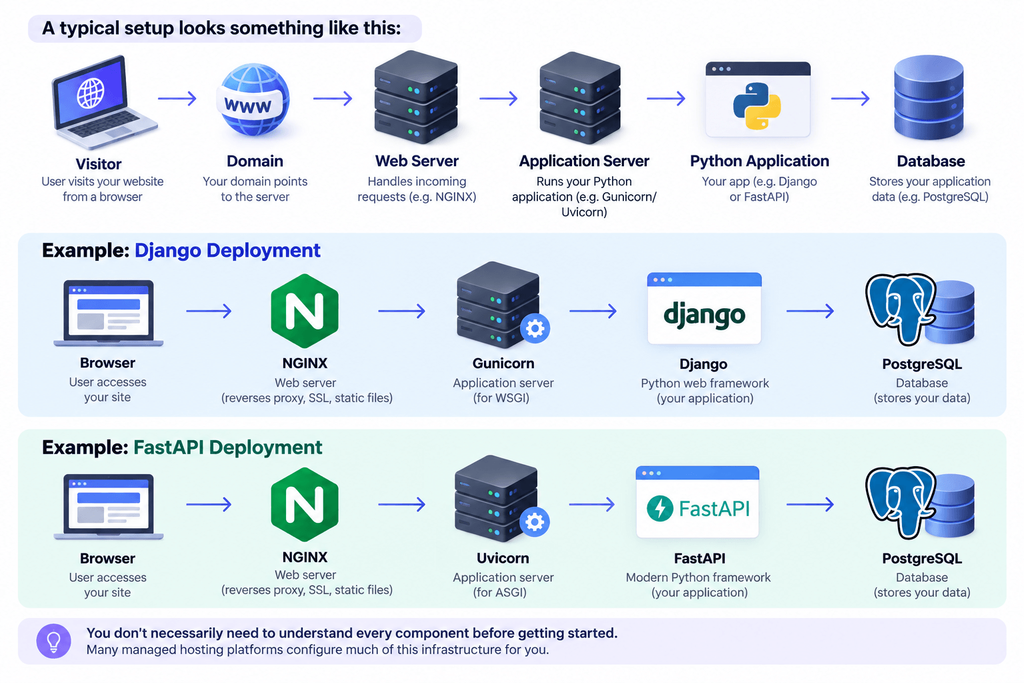
First, the browser sends a request to your server. A web server such as NGINX or Apache receives that request.
For a dynamic page, the request is then passed to an application server capable of communicating with your Python application.
Two common standards make this possible:
WSGI (Web Server Gateway Interface) is commonly used by synchronous Python frameworks and applications.
ASGI (Asynchronous Server Gateway Interface) supports asynchronous applications and features such as WebSockets and long-lived connections.
Django can work with WSGI or ASGI, while Flask commonly uses WSGI. FastAPI is built around ASGI.
Application servers include tools such as:
- Gunicorn
- Uvicorn
- uWSGI
Your Python application processes the request, communicates with databases or external services when necessary, and creates a response.
That response travels back through the server to the user’s browser.
In simplified form:
User Request → Web Server → WSGI/ASGI Server → Python Application → Database/API → Response
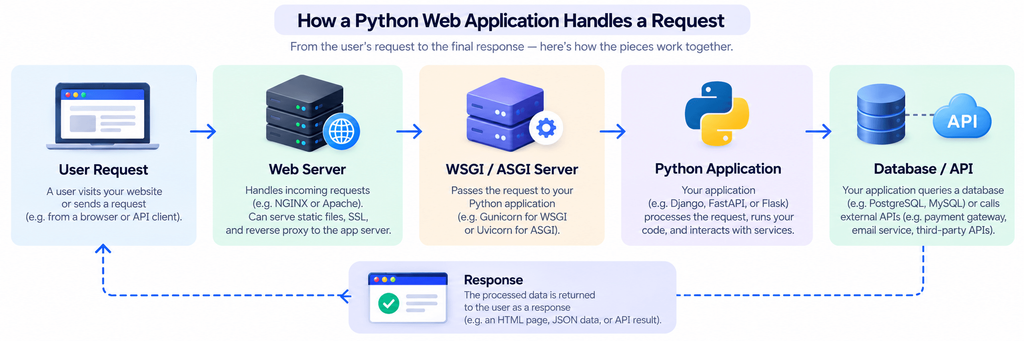
This architecture allows Python applications to generate dynamic pages, authenticate users, process payments, retrieve database records, provide API responses, and perform many other server-side tasks.
What Can You Host With Python Hosting?
Python hosting isn’t limited to traditional websites. Python’s ecosystem makes it suitable for everything from simple portfolio projects to APIs, SaaS platforms, automation systems, and AI-powered applications.
Django Websites
Django is a full-featured Python web framework commonly used for database-driven applications.
It includes features for routing, authentication, database management, security, forms, administration, and more.
Python hosting can be used for Django projects such as:
- Business websites
- Customer portals
- Booking platforms
- E-commerce applications
- Learning platforms
- Content management systems
- Internal business applications
Production Django applications generally require WSGI or ASGI support and access to a compatible database.
Flask Applications
Flask is a lightweight Python web framework that gives developers more flexibility over how an application is structured.
It’s useful for:
- Small web applications
- Internal tools
- Dashboards
- Prototype applications
- Microservices
- REST APIs
Because Flask has relatively few built-in assumptions, developers can add the libraries and components their applications require.
FastAPI Applications
FastAPI has become a popular framework for building high-performance APIs with Python.
It supports asynchronous programming and uses ASGI.
Common FastAPI workloads include:
- REST APIs
- Backend services
- Mobile application backends
- Microservices
- AI model endpoints
- Real-time services
If you plan to deploy FastAPI, make sure your hosting environment supports ASGI applications and servers such as Uvicorn.
APIs
Python is widely used for building APIs that connect websites, mobile apps, databases, and external services.
For example, a mobile application might send a request to a Python API. The API authenticates the user, retrieves information from a database, and sends JSON data back to the application.
Django REST Framework, Flask, and FastAPI can all be used to build APIs.
SaaS Applications
Python is also suitable for Software-as-a-Service applications.
A Python-powered SaaS platform might include:
- User registration and authentication
- Subscription management
- Dashboards
- Background processing
- Email notifications
- REST APIs
- Payment integrations
- Database-driven features
As a SaaS application grows, it may eventually require more resources and flexibility than entry-level shared hosting provides. A VPS or scalable cloud environment can then become more appropriate.
Automation and Scripts
Python is well known for automation.
Depending on your hosting provider, you may be able to run:
- Scheduled scripts
- Data-processing jobs
- Report generation
- Database maintenance tasks
- Email automation
- Data imports and exports
- Background workers
Cron jobs can be particularly useful when a Python script needs to execute on a schedule.
AI & Machine Learning Applications
Python is one of the dominant programming languages for artificial intelligence and machine learning.
Libraries such as NumPy, pandas, scikit-learn, PyTorch, and TensorFlow make Python useful for developing data and AI applications.
However, there’s an important distinction between hosting an interface that uses AI and running a large AI model directly on the server.
A small application that sends requests to an external AI API may run comfortably on ordinary Python hosting. Running computationally intensive machine-learning models yourself may require substantially more CPU, RAM, or GPU resources.
In those situations, VPS, cloud, dedicated, or GPU infrastructure may be more appropriate.
Key Features to Look for in Python Hosting
Two hosting plans can both advertise “Python support” while providing very different capabilities.
Before choosing a provider, check for the following.
Multiple Python versions: Your hosting environment should support a Python version compatible with your project.
pip support: pip allows you to install packages and libraries required by your application.
Virtual environments: Virtual environments isolate project dependencies and help prevent package conflicts between applications.
Framework compatibility: Check whether the environment supports Django, Flask, FastAPI, or whichever framework you’re using.
WSGI/ASGI support: Django and Flask deployments frequently rely on WSGI, while FastAPI requires ASGI.
SSH access: Secure Shell access can make deployment, troubleshooting, Git operations, and dependency management significantly easier.
Git support: Git-based deployment makes updating and managing application code more convenient.
Database support: Check compatibility with your required database, such as PostgreSQL or MySQL.
Environment variables: Sensitive credentials such as database passwords and API keys should be stored outside your source code.
SSL certificates: HTTPS protects communication between your visitors and application.
Cron jobs: Useful for scheduled scripts, backups, reports, and recurring background tasks.
Application logs: Logs are essential when diagnosing errors or monitoring application behaviour.
Backups: Regular backups protect your application files and databases.
Scalability: Your hosting should have a practical upgrade path if traffic or resource requirements increase.
Technical support: Python-aware support can be particularly useful if you’re deploying your first production application.
Types of Python Hosting
There’s no single hosting type that’s best for every Python application.
The right choice depends on your project’s size, technical requirements, expected traffic, budget, and how much server management you want to handle yourself.
Shared Python Hosting
Shared hosting places multiple customers on the same physical server.
Python-compatible shared hosting can be an economical option for:
- Students
- Developers learning Python
- Portfolio projects
- Small websites
- Lightweight Django applications
- Small Flask applications
The main limitation is control. You usually won’t receive root access and may face restrictions on processes, packages, CPU, memory, or server configuration.
VPS Hosting
A Virtual Private Server (VPS) gives you an isolated virtual server with allocated resources.
Compared with shared hosting, a VPS generally provides considerably more control.
You can typically configure your own:
- Python versions
- Web servers
- Application servers
- Databases
- Firewall rules
- Background services
- System packages
A VPS can be a strong choice for production Django applications, APIs, SaaS platforms, and projects requiring custom server configurations.
The trade-off is responsibility.
With an unmanaged VPS, you’re responsible for server configuration, security updates, monitoring, and maintenance.
Cloud Hosting
Cloud hosting runs applications on cloud infrastructure rather than relying on a single traditional hosting server.
Depending on the platform, it can offer flexible resource allocation, automation, load balancing, managed databases, and scaling capabilities.
Cloud hosting is particularly useful for applications with changing resource requirements or infrastructure that needs to scale across multiple services.
However, cloud environments can also become more complex and their pricing may be less predictable than a fixed hosting plan.
Dedicated Hosting
A dedicated server gives you an entire physical server.
It offers high levels of control and resource isolation but usually costs considerably more than shared hosting or a VPS.
Dedicated servers may be appropriate for:
- High-traffic applications
- Large databases
- Resource-intensive workloads
- Organizations requiring specialized configurations
- Applications with strict infrastructure requirements
For most beginner Python projects, a dedicated server is unnecessary.
Platform as a Service (PaaS)
A Platform as a Service abstracts much of the underlying server administration.
Instead of configuring an entire server yourself, you deploy your application and let the platform handle more of the infrastructure.
PaaS can be useful for developers who want to concentrate on application code rather than system administration.
The trade-offs can include less infrastructure control, platform-specific limitations, and costs that rise as an application scales.
Which Type Should You Choose?
Here’s a simplified comparison:
| Hosting Type | Cost | Technical Knowledge | Control | Scalability | Best For |
|---|---|---|---|---|---|
| Shared Python Hosting | Low | Low–Medium | Low | Limited | Beginners and small apps |
| VPS | Medium | Medium–High | High | Good | Production apps and APIs |
| Cloud | Variable | Medium–High | High | Excellent | Growing/scalable applications |
| Dedicated | High | High | Very High | High | Large workloads |
| PaaS | Variable | Low–Medium | Medium | Excellent | Developers wanting easier deployment |
For a small Python project, starting with managed Python hosting can keep things simple.
If you need root access, custom system packages, background services, or more resources, a VPS is often the next logical step.
Python Hosting for Django vs Flask vs FastAPI
The framework you’re using influences what your hosting environment needs to support.
| Framework | Common Use | Interface | Typical Server |
|---|---|---|---|
| Django | Full web applications | WSGI/ASGI | Gunicorn/Uvicorn |
| Flask | Lightweight apps and APIs | WSGI | Gunicorn |
| FastAPI | APIs and async applications | ASGI | Uvicorn |
Django
Django is a good fit when you want many common web-development features available within one framework.
Look for hosting with database support, static-file handling, WSGI or ASGI, virtual environments, and the ability to install project dependencies.
Flask
Flask is lightweight and flexible.
Because every Flask project can be structured differently, package installation and environment configuration are particularly important.
FastAPI
FastAPI relies on ASGI.
Before purchasing hosting for a FastAPI project, verify that the provider actually supports persistent ASGI applications. Simply advertising “Python support” doesn’t guarantee that every Python framework will work.
Your framework isn’t the only consideration. Traffic, memory requirements, background workers, databases, and required system packages can ultimately determine which hosting plan you need.
How to Host a Python Website
Deployment varies by provider, but most Python applications follow the same general process.
Step-by-Step Deployment
Step 1: Choose Python-Compatible Hosting
Check the supported Python versions, frameworks, databases, application servers, and resource limits before purchasing.
Step 2: Connect Your Domain
Point your domain’s DNS records to the hosting server.
DNS changes may require some time to propagate across the internet.
Step 3: Upload Your Project
Upload the application through your hosting control panel, SFTP, SSH, or Git.
For development teams, Git is generally the cleaner approach because application changes can be tracked and deployed more consistently.
Step 4: Select Your Python Version
Choose a Python runtime compatible with your project and its dependencies.
Step 5: Create a Virtual Environment
Create an isolated environment for the project so its packages don’t conflict with other Python applications.
Step 6: Install Dependencies
Most projects store dependencies inside requirements.txt.
They can typically be installed using:
pip install -r requirements.txt
Step 7: Configure WSGI or ASGI
Configure the appropriate application entry point.
Django or Flask may use WSGI, while FastAPI generally requires ASGI.
Step 8: Configure Your Database
Create your database and database user, then add the required connection details to your application’s environment configuration.
Step 9: Configure Environment Variables
Store secrets such as:
- Database credentials
- API keys
- Django SECRET_KEY
- Email credentials
- Third-party service tokens
Avoid hard-coding sensitive credentials directly into your application.
Step 10: Configure Static Files
Applications such as Django may require a separate static-file collection and serving configuration.
Step 11: Enable HTTPS
Install an SSL certificate and redirect HTTP traffic to HTTPS.
Step 12: Test the Application
Test important functionality such as:
- Pages and routes
- Login
- Database connections
- Forms
- APIs
- Static files
- Emails
- Background jobs
Finally, inspect the application logs for unexpected errors.
How to Host a Python Application Using cPanel
Some hosting providers offer Python application management directly through cPanel.
The exact interface depends on the server configuration, but the deployment process often looks like this.
1. Open Setup Python App
Log in to cPanel and find Setup Python App or the equivalent Python application manager.
2. Select a Python Version
Choose the version required by your project.
Make sure your dependencies support that version.
3. Configure the Application Root
Set the directory containing your application’s files.
For example:
my_python_app
4. Choose the Application URL
Select the domain or subdomain where the application should be available.
For example:
app.example.com
5. Create the Application
cPanel creates the Python environment and provides configuration information for your application.
6. Upload Your Project
Upload the project files or deploy them using Git if available.
7. Install Dependencies
Install the packages listed in your requirements.txt file within the application’s virtual environment.
8. Configure the Startup File
Set the correct WSGI application/startup configuration for your framework.
The exact file and callable depend on whether you’re using Django, Flask, or another framework.
9. Add Environment Variables
Configure database credentials, secret keys, API keys, and other environment-specific values through the application settings when supported.
10. Restart the Application
After making configuration or code changes, restart the Python application.
Then visit your domain and check the application’s error logs if something doesn’t load correctly.
Important: cPanel features depend on how the hosting provider has configured the server. Seeing cPanel doesn’t automatically mean Python application hosting is enabled. Confirm Python support before purchasing.
Python Hosting vs VPS Hosting
Should you buy specialized Python hosting or deploy your application on a VPS?
It depends primarily on how much control you need.
| Factor | Managed/Shared Python Hosting | VPS |
|---|---|---|
| Setup | Easier | More involved |
| Root access | Usually no | Usually yes |
| Server management | Provider handles more | You handle more |
| Package flexibility | Some restrictions | High |
| Custom services | Limited | Yes |
| Cost | Usually lower | Usually higher |
| Scaling | Plan dependent | Flexible |
| Security management | Provider handles server layer | Your responsibility on unmanaged VPS |
| Beginner friendly | Yes | Requires server knowledge |
Choose managed Python hosting if you’re building a relatively small application and want the provider to manage most of the server environment.
Choose a VPS if you need custom server packages, root access, persistent background services, greater resources, or more control over the deployment architecture.
Benefits of Python Hosting
A hosting environment designed for Python can make deployment significantly easier.
Easier Deployment
Instead of trying to make Python work inside an unsupported environment, you start with infrastructure designed to run Python applications.
Dependency Management
pip and virtual environments make it easier to manage project-specific libraries.
Framework Compatibility
Suitable Python hosting can support popular frameworks such as Django, Flask, and FastAPI.
Database Integration
Python applications can connect to databases such as PostgreSQL and MySQL for dynamic data storage.
Better Isolation
Virtual environments separate dependencies between projects, reducing version conflicts.
Developer-Friendly Tools
SSH, Git, application logs, environment variables, and command-line access make development and troubleshooting easier.
Scalability
A good hosting provider gives you an upgrade path as your application attracts more users and consumes more resources.
Python Hosting Security Best Practices
Putting your Python application online also means making it accessible to potential attackers.
Basic security practices shouldn’t be optional.
Keep Python and dependencies updated. Older libraries can contain known security vulnerabilities.
Never hard-code passwords or API keys. Store secrets using environment variables or an appropriate secrets-management system.
Disable debug mode in production. Debug pages can reveal sensitive information about your application and server.
For Django, production environments should use:
DEBUG = False
Use HTTPS. Install an SSL certificate and redirect unencrypted traffic to HTTPS.
Use strong database credentials. Give application database accounts only the permissions they actually need.
Secure SSH. If SSH is enabled, use strong authentication practices and restrict unnecessary access.
Validate user input. Never trust information submitted by users.
Back up your application. Maintain backups of both application data and databases, and verify that they can be restored.
Monitor logs. Logs can reveal errors, suspicious activity, failed authentication attempts, and unexpected application behaviour.
Security is a continuous process, not something you configure only when the website launches.
Common Python Hosting Problems and Solutions
Python applications sometimes work perfectly locally and fail immediately after deployment.
Here are several common causes.
| Problem | Likely Cause | What to Check |
|---|---|---|
| 500 Internal Server Error | Application/configuration error | Error logs |
| ModuleNotFoundError | Missing package | Virtual environment and requirements.txt |
| Wrong Python version | Runtime mismatch | Hosting Python configuration |
| Static files missing | Incorrect static configuration | Static paths/collection |
| Database connection error | Wrong credentials/network settings | Environment variables |
| App won’t start | WSGI/ASGI configuration | Startup file/application callable |
| Dependency installation fails | Unsupported package/system library | pip output and system requirements |
| Works locally but not online | Environment difference | Variables, versions, paths and logs |
500 Internal Server Error
Don’t guess.
Check your application’s error logs first. They usually contain the information needed to identify the underlying exception.
ModuleNotFoundError
This usually means the package hasn’t been installed in the environment where the application is running.
Confirm you’re using the correct virtual environment and install the project’s dependencies.
Static Files Aren’t Loading
This is particularly common with Django deployments.
Check static-file paths, your production static configuration, and whether you’ve run the appropriate static-file collection command.
Database Connection Errors
Verify:
- Database hostname
- Database name
- Username
- Password
- Port
- User privileges
- Network restrictions
Also confirm that your production environment variables are actually being loaded.
Application Works Locally but Not on the Server
Compare the two environments.
Look for differences in Python versions, dependencies, environment variables, file paths, database configuration, operating-system packages, and WSGI/ASGI settings.
The server logs should usually be your first troubleshooting stop.
How Much Does Python Hosting Cost?
Python hosting doesn’t have one standard price.
The cost depends on the infrastructure and resources required by your application.
Shared Python hosting is generally the least expensive option and may be sufficient for learning projects and smaller applications.
A VPS costs more but provides dedicated resources and greater server control.
Cloud hosting can start relatively small but costs may change as you consume additional compute, storage, bandwidth, database, and other resources.
Dedicated servers generally sit toward the higher end because you’re paying for an entire physical machine.
Factors that can affect Python hosting prices include:
- CPU
- RAM
- Storage
- Bandwidth
- Server location
- Control panel licensing
- Backup services
- Managed support
- Database requirements
- Scaling
- Additional IP addresses
Don’t choose a hosting plan based only on the lowest advertised price.
A cheap plan isn’t a bargain if it can’t run your application’s dependencies or gives you too little memory to keep the application stable.
How to Choose the Best Python Hosting Provider
Before purchasing Python hosting, answer these questions:
- Which Python versions are supported?
- Does it support my framework?
- Can I install packages using pip?
- Are virtual environments available?
- Does it support WSGI and/or ASGI?
- Do I get SSH access?
- Can I deploy through Git?
- Which databases are available?
- Can I configure environment variables?
- Are SSL certificates available?
- Are backups included or available?
- Can I access application and server logs?
- What are the CPU and memory limits?
- Can I upgrade easily when the application grows?
- Does the provider offer useful technical support?
Also consider where your users are located.
If most of your visitors are in Nepal, network latency and the location of your hosting infrastructure can influence application responsiveness. If your audience is global, infrastructure with strong international connectivity or CDN integration may be more important.
The “best Python hosting” isn’t necessarily the provider with the longest feature list. It’s the hosting environment that matches your application’s actual requirements.
Python Hosting in Nepal: What Should You Consider?
If you’re a developer, student, startup, or business searching for Python hosting in Nepal, there are a few additional factors worth considering.
Performance for Your Target Audience
Where are most of your users?
If you’re developing primarily for users in Nepal, server connectivity and latency to Nepal matter. For an international audience, strong global connectivity and CDN availability may matter more.
Local Technical Support
Deploying a Python application can be more complicated than uploading a basic HTML or WordPress website.
Access to responsive support can therefore be valuable, particularly if you’re deploying Python for the first time.
Ask whether the hosting provider actually supports Python application deployment rather than simply having Python installed somewhere on the server.
Payment Options
International cloud providers often require international payment methods and bill in foreign currencies.
A Nepal-focused hosting provider may offer local payment methods and billing that are more convenient for Nepalese customers.
Framework Support
Don’t assume “Python hosting” means every Python framework is supported.
If you’re deploying Django, Flask, or FastAPI, confirm compatibility before buying.
FastAPI deserves particular attention because it requires an ASGI-compatible environment.
Resource Limits
Check CPU, memory, storage, process, and execution limits.
A development project may need very little infrastructure, while a production SaaS application can quickly outgrow entry-level shared hosting.
Backup and Security
Check how often backups are created, how long they’re retained, and how restoration works.
Also consider SSL, malware protection, account isolation, firewalling, and server maintenance.
Upgrade Options
Your first hosting plan doesn’t need to handle a million users.
It does need to give you somewhere sensible to go if your application succeeds.
Look for a provider that allows you to move from smaller hosting to more powerful infrastructure without unnecessary migration headaches.
For developers and businesses that prefer local support and payment options, Prabhu Host can provide a practical starting point for exploring hosting solutions suitable for Python projects in Nepal. Before selecting any plan, match its available Python versions, framework support, resource limits, and server capabilities to your application’s requirements.
Frequently Asked Questions About Python Hosting
What is Python hosting?
Python hosting is a web hosting environment capable of running applications written in Python. It typically provides access to a Python runtime, package management, virtual environments, databases, and the server interfaces needed to deploy frameworks such as Django, Flask, and FastAPI.
Can I host a Python website on normal web hosting?
Sometimes, but not every web hosting environment supports Python applications.
Your hosting needs the correct Python runtime and must allow the application to run through an appropriate WSGI or ASGI setup. Check the provider’s Python capabilities before purchasing.
Which hosting is best for Python?
It depends on the project.
Managed or shared Python hosting can be suitable for small applications and beginners. A VPS provides greater control for production applications, while cloud platforms can be appropriate for applications requiring extensive scaling.
Can Python run on cPanel hosting?
Yes, if the hosting provider has enabled Python application support.
Some cPanel environments include a Python application manager that allows you to select a Python version, configure an application, install dependencies, and manage environment variables.
cPanel itself doesn’t guarantee Python application support.
Can I host Django on shared hosting?
Yes, if the shared hosting environment specifically supports Django and provides the necessary Python runtime, packages, WSGI/ASGI configuration, database access, and sufficient resources.
For larger Django applications, a VPS or cloud environment may offer greater flexibility.
Can Flask run on shared hosting?
Yes. Flask can run on Python-compatible shared hosting that supports WSGI applications and allows your required dependencies.
What hosting does FastAPI need?
FastAPI requires an ASGI-compatible environment.
It’s commonly deployed using an ASGI server such as Uvicorn, sometimes behind a reverse proxy such as NGINX. Confirm ASGI support before choosing a hosting plan for FastAPI.
Do I need a VPS for Python?
Not necessarily.
Small Django or Flask applications may run well on managed Python hosting. A VPS becomes useful when you need root access, custom system packages, dedicated resources, background services, or greater control over your server.
Can I run Python scripts on web hosting?
Some Python hosting plans allow standalone scripts and scheduled Python jobs.
Check whether the provider supports cron jobs, command-line execution, background processes, and the specific packages required by your script.
Does Python hosting support MySQL and PostgreSQL?
Many Python hosting environments support MySQL, PostgreSQL, or both, but availability varies by provider and hosting plan.
Always verify database support before purchasing.
Do I need SSH access for Python hosting?
SSH isn’t mandatory for every managed environment, but it’s extremely useful.
It allows developers to manage files, run commands, install dependencies, use Git, inspect logs, perform migrations, and troubleshoot applications more efficiently.
Can Python hosting be used for AI applications?
Yes, but the infrastructure requirements depend on what the application does.
A lightweight Python application that communicates with an external AI API may need relatively few resources. Hosting large machine-learning models directly can require significant CPU, RAM, or GPU resources and may need specialized cloud or dedicated infrastructure.
Final Thoughts
Python hosting provides the server environment needed to take a Python project from your local computer and make it accessible online.
But there’s no universal hosting plan that’s right for every Python application.
For a small Django or Flask project, managed Python hosting may provide everything you need without requiring extensive server administration.
For production applications that need custom packages, background services, dedicated resources, or greater control, a VPS may be a better fit.
And applications expecting significant growth or highly variable workloads may benefit from scalable cloud infrastructure.
Whatever option you choose, don’t look only for the words “Python supported.”
Check the Python version, framework compatibility, pip and virtual environment support, WSGI/ASGI capabilities, database options, SSH access, resource limits, backups, security, and upgrade path.
If you’re looking for Python hosting in Nepal, also consider local support, payment convenience, network performance, and how easily your hosting can grow alongside your application.
Choose infrastructure that fits what your application needs today—and gives you room to build what comes next.